Summary
- Bookmarks on Twitter are a private feature that allows users to save tweets for later without alerting others or making them public.
- Twitter does not notify the original poster when you bookmark their tweet, ensuring your saved content stays confidential.
- Bookmarks are limited to your account and cannot be seen by anyone else, including other users or followers.
- If you bookmark a tweet, there are no actions visible to others, and only you can access and manage your bookmarked tweets.
Picture this: You’re scrolling through Twitter (or “X,” if we’re being technical) 📱, and you come across a tweet so good you just have to save it.
Maybe it’s a hilarious meme 😂, a juicy article 📰, or a hot take 💬. You hit the “bookmark” button 🔖—but then, panic sets in.
What if someone sees your bookmarks? 👀 Can the tweet’s author find out? Are bookmarks the new retweets? 🫣
If these questions sound familiar, don’t worry—you’re not alone. Bookmarking tweets can feel oddly personal, and the last thing you want is to accidentally reveal what caught your attention at 2 AM. 🕑
But relax—I’ve got you covered. 🕵️ This guide breaks down everything you need to know about Twitter bookmarks and your privacy.
⚡️ Short Answer:
Your bookmarks are totally private. ✅
But keep reading to learn why, how to use bookmarks like a pro, and what all the fuss is about. 🚀
This Podcast IS Published For You!
Are Your Twitter Bookmarks Actually Private?
The short answer? Yes, absolutely! ✅ Your bookmarks on Twitter are private—completely and utterly yours. Not even the person who posted the tweet will know you saved it. 📚✨
Twitter introduced bookmarks in 2018 to give users a way to save tweets for future reference. 🗂️
Unlike retweets and likes, which are public and viewable on your profile, bookmarks were designed to be your secret stash of saved content. 🤫
But wait—it gets a little tricky. 🤔
While Twitter (or X) recently rolled out the “bookmark count” feature, this only reveals how many users bookmarked a tweet, not who bookmarked it. 👀
Think of it like a movie rating 🍿—everyone can see the score, but not who gave it that 5-star review. ⭐⭐⭐⭐⭐
Here’s a direct reference from Twitter’s official Help Center:
“Bookmarks are private to your account and only visible to you. The person who posted the Tweet isn’t notified when you bookmark their Tweet.”
🤡 Fun Fact:
I freaked out when I saw the bookmark count feature—thought my secret meme stash was exposed.
But nope, all good. Safe for another day. 😉” – @SocialMediaFan98 on X.

How Do Twitter Bookmarks Work?
Now that privacy concerns have been addressed, here is a comprehensive guide to effectively using Twitter bookmarks. 📚
This feature allows users to save and organize tweets for future reference, serving as a valuable tool for various purposes, from research to content planning.
How to Save Tweets to Bookmarks
Bookmarking tweets is a straightforward process, whether you are using the mobile app 📱 or the desktop version 💻 of Twitter:
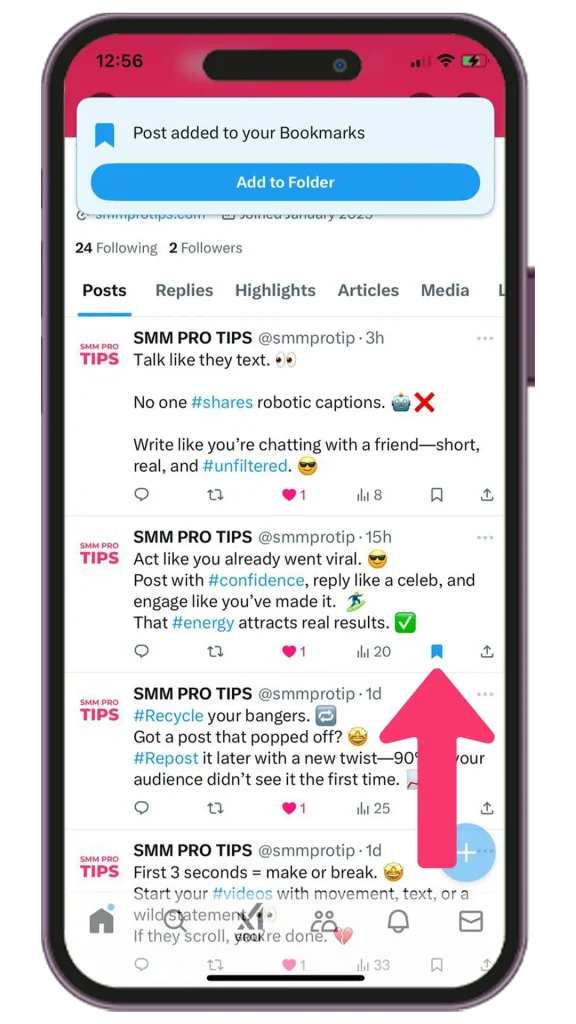
On Mobile:
- Open the Twitter application and navigate to the tweet you wish to save.
- Tap the bookmark icon (represented by an 🔖).
On Desktop:
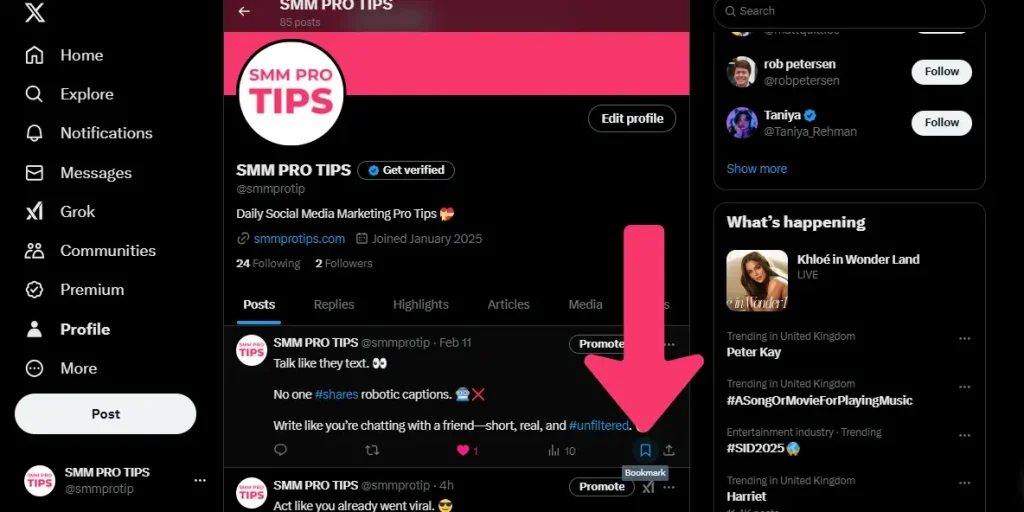
- Log in to your Twitter account and locate the desired tweet.
- Click on the bookmark icon ➡️.
⚡️ PRO Tip:
Bookmarks are versatile and can be utilized for various purposes, such as compiling resources for research, organizing ideas for content creation, or even saving lighthearted content like memes 😂 that you prefer not to interact with publicly.
How to Access Your Bookmarks
Once you have saved tweets, accessing them is simple and requires minimal effort. Follow these steps based on the platform you are using:
On Mobile:
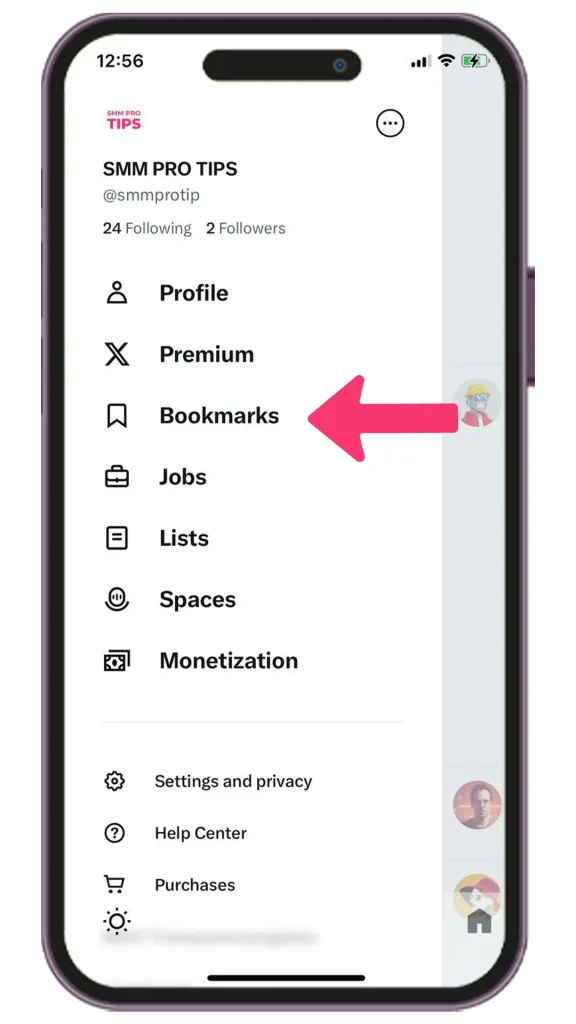
- Tap on your profile avatar to open the side menu.
- Select “Bookmarks” from the menu options.
On Desktop:
- Locate the left-hand sidebar on the homepage.
- Click on “Bookmarks” to access your saved tweets.
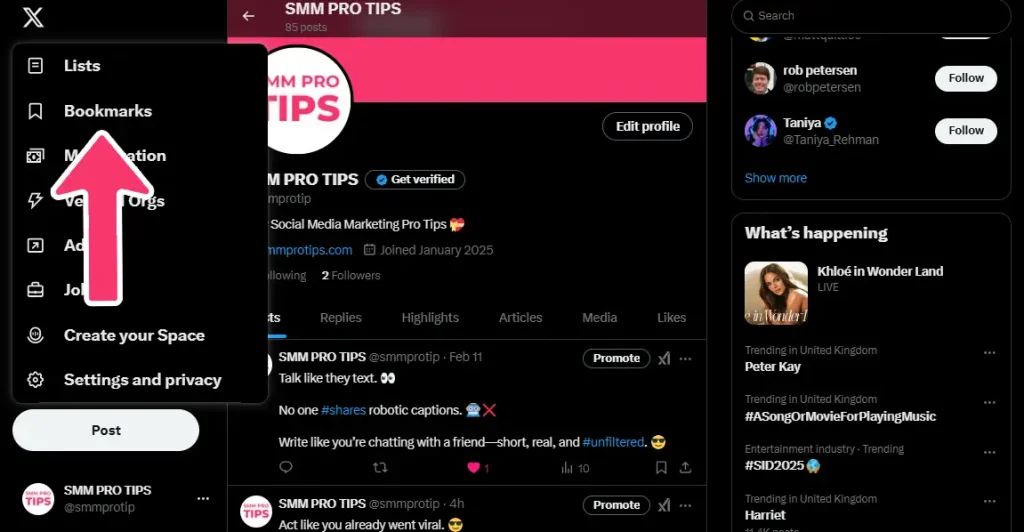
By following these steps, you can efficiently manage your saved tweets without the need for extensive searching. 🔍
This feature enables easy access to valuable information, ensuring a seamless and organized experience on the platform.
Organizing Your Bookmarks
Free users should note that the option to organize bookmarks into folders 🗂️ is not available. This feature is exclusively offered to Twitter Blue (X Premium) subscribers. 💙
For those who prefer a more structured and organized bookmarking system, upgrading to Twitter Blue may be a worthwhile consideration.
Alternatively, users can manage their bookmarks by being selective about the content they choose to save. 🎯
⚡️ PRO Tip:
Marie Kondo your bookmarks every now and then. Does that tweet still spark joy? Yes? Keep it. No? Delete.

Public vs. Private Features on Twitter
Curious about how bookmarks 📌 compare to other Twitter features? Likes, Retweets, and Threads 🧵 each serve a unique purpose.
Here’s a quick breakdown of where bookmarks fit in and how they can enhance your Twitter experience 🚀.
| Feature | Public or Private? | Use Case |
|---|---|---|
| 🔖Bookmarks | 🔒 Private | Save tweets for personal reference. |
| ❤️Likes | 🌍 Public | Show approval (and sometimes save content). |
| 🔁Retweets | 🌍 Public | Share tweets with your followers. |
| 📋Lists | 🌍 Public or 🔒 Private | Curate accounts based on interests/topics. |
If you’re a creator or journalist saving tweets for research, keep in mind that bookmarks 📌 are a great tool for keeping track of important content.
Unlike the “Twitter lists a few followers” feature, bookmarks remain completely private 🔒 and are only visible to you.
This makes them ideal for organizing information 📂 or referencing tweets without broadcasting your interests or research topics to others.

Why Bookmark Counts Sparked Debate
The introduction of “bookmark counts” in 2023 raised some eyebrows in the Twitter community. 🤔
While some users found it insightful to see how popular a tweet was, others saw it as a step toward less privacy. 🕵️♂️
The Debate in Tweets:
The Critics: “Why do we need to see bookmark counts? Feels surveillance-y. Not a fan.”
Critics argue that showing bookmark counts could infringe on users’ sense of privacy, making them feel like their actions are being overly monitored. 🛑
Some worry it adds unnecessary transparency to what was once a personal interaction with content. 🚨
The Supporters: “Bookmark counts are a win for creators! Data like this helps me refine my Twitter marketing tips.”
Supporters believe that bookmark counts provide valuable insights for content creators, helping them understand what resonates with their audience. 📈
For marketers and creators, this data can be a powerful tool to optimize strategies and reach more people effectively. 🎯
Regardless of where you stand, the key takeaway remains the same—your identity remains completely private. 🔒
Even if a tweet has 1,000 bookmarks, nobody knows it was you who saved it. 😉

Troubleshooting Twitter Bookmarks
Bookmarks acting weird? Don’t worry, here’s how to fix some common problems with a bit more context:
Tweet Disappeared? 🐦❌
If you can’t find a bookmarked tweet, it’s possible the author deleted it. 🗑️
Alternatively, it might have been removed by Twitter for violating community guidelines. Unfortunately, there’s no way to retrieve it once it’s gone.
Can’t Access Bookmarks? 📁🔒
If your bookmarks aren’t loading or you’re having trouble accessing them, try updating your app to the latest version. 🔄📲
Outdated versions can sometimes cause glitches. You can also try clearing your app’s cache to give it a refresh and resolve potential bugs. 🧹🐛
If the problem persists, log out and back in, or contact Twitter Support.
Bookmarks Gone? 😱📉
If your bookmarks seem to have vanished, don’t panic! 🙌
They’re likely still there. Try logging out of your account and logging back in—this often solves any temporary syncing issues. 🔑🔄
If the problem persists, consider reaching out to Twitter’s support team. 🛠️💬
With these steps, your bookmarks should be back to normal in no time!
⚡️ PRO Tip:
If bookmarks are crucial for your workflow, consider backing up important tweets manually (e.g., screenshotting).

Your Secret Tweet Goldmine Awaits
In conclusion:
Twitter bookmarks are private, so you can save tweets without worry. 🔒
No one else can see the tweets you’ve bookmarked, making it a great tool for keeping track of posts you want to revisit. 📌
Bookmark counts show how many people saved a tweet, but not who. 🔢 This means your activity remains anonymous while still contributing to the overall popularity of a post. 📈
By taking advantage of this feature, you can streamline your timeline 🕒 and create a personalized space for your favorite tweets. 🌟

It’s a small tool that can make a big difference in managing the constant flow of information on Twitter. 🎯 Ready to give it a try? 🤔
For more tips on mastering Twitter and social media marketing tips, explore our other articles. 💡
Private Bookmarks on Twitter FAQs
Bookmarks on Twitter are a handy way to save tweets for later without making your actions visible to others 📚👀. However, some users worry about whether their privacy is truly secure when using this feature 🔒.
Here, we’ll tackle the most common questions about how private bookmarks really are, so you can use them confidently ✅.
No, Twitter doesn’t notify users when someone bookmarks their tweet. Bookmarking is a private action visible only to you. Unlike likes or retweets, which are public, bookmarks are stored in your account without alerting others.
No, bookmarks are entirely private and cannot be viewed by anyone else. Each user’s bookmarks are their own personal collection and aren’t accessible or visible, even to followers or mutuals.
No, Twitter does not allow users to see anyone else’s bookmarks. While features like replies or likes offer some visibility into someone’s interactions, bookmarks remain confidential and are not shared publicly in any way.
No, users cannot see who bookmarked their post. While the “bookmark count” feature shows how many people saved a tweet, it does not reveal the identities of those users. Your bookmarking activity is completely anonymous and private.